

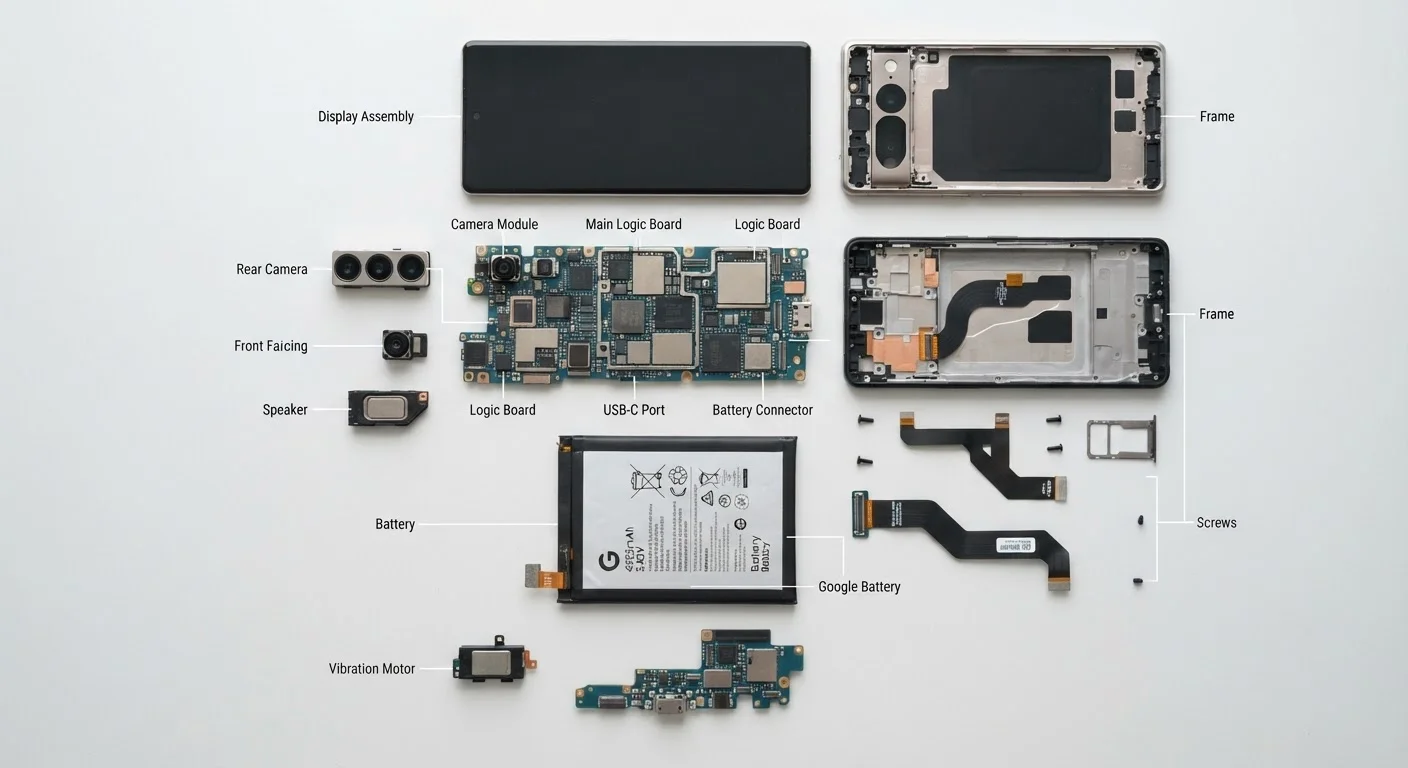
How a device is built and what that means for longevity
Before a device reaches a store shelf, its lifespan is already partially determined by decisions made during design and manufacturing. Component quality, repairability, and thermal design all influence how many years of useful service a device can realistically deliver.
Manufacturers balance cost, thinness, and assembly speed against repairability. Devices where components are glued rather than screwed together are harder and more expensive to service. Batteries soldered to the motherboard, for instance, cost significantly more to replace than those held in place with standard fasteners. Families who want devices that age well should look for models with published repair documentation or serviceable batteries, details covered in our beginner's guide to home electronics.
Thermal design is another factor that shapes longevity. Heat is the leading cause of accelerated component degradation in consumer electronics. Devices with adequate ventilation or active cooling sustain performance longer than those that trap heat to achieve a slimmer profile.
The support window: software as a timer
Hardware condition alone does not define a device's useful life. The manufacturer's software support window sets a hard deadline on how safely and effectively a device can be used for tasks involving personal data, financial accounts, or network access.
Support windows vary by product category. Laptops running major operating systems have historically received updates for around five to ten years. Smartphones have shorter windows, commonly three to seven years from release. Smart home devices and budget tablets sometimes receive fewer than three years of updates.
After end-of-life: limited but real uses remain
When a device reaches end-of-life, any remaining hardware capability does not disappear overnight. Devices past their support window can still run offline tasks like playing locally stored media or word processing without network connectivity. The risk concentrates in connected use cases. Families can consult our plain-language hardware glossary to understand which specs affect this kind of performance over time.
When a device reaches end-of-life, any remaining hardware capability does not disappear overnight. Devices past their support window can still run offline tasks like playing locally stored media or word processing without network connectivity. The risk concentrates in connected use cases. Families can consult our plain-language hardware glossary to understand which specs affect this kind of performance over time.
Active use: how families can slow the clock
The active-use phase is where daily habits have the most influence. Physical care, storage management, and battery practices all affect how long a device stays functional and responsive.
Battery health degrades with every charge cycle, but the rate of degradation depends on behavior. Keeping a lithium battery between roughly 20 and 80 percent charge, rather than cycling it from zero to full repeatedly, tends to slow capacity loss over time. Avoiding prolonged exposure to heat while charging also helps.
Storage depletion is one of the most common causes of slowdowns that families mistake for hardware failure. When internal storage fills past roughly 85 to 90 percent capacity, operating systems struggle to write temporary files efficiently, producing noticeable lag. Clearing unused apps, offloading photos to external storage or a cloud service, and periodically auditing downloads can restore performance without any hardware change.
For deeper care habits that apply specifically to portable computers, see our guide on extending a laptop's useful life.
Repair versus replace: making a rational call
The repair-or-replace decision depends on three variables: the cost of the repair, the remaining software support window, and the device's current resale value. These numbers together reveal whether money spent on a fix will pay off in extended useful life.
A battery replacement on a device with four years of software support remaining is generally a sound investment. The same repair on a device six months from end-of-life returns little value. Screen replacements, which are often the most expensive repair, require the same math. If the repair cost approaches or exceeds 50 percent of a comparable current device's price, and the software window is short, replacement is often the financially rational choice.
Some maintenance tasks families can handle themselves, without professional service, are covered in our guide to realistic DIY upkeep. The principle of doing small preventive work to avoid large corrective costs applies to electronics as much as it does to vehicles.
End-of-life: disposal, data, and what happens to materials
When a device is retired, two responsibilities remain: protecting personal data and handling materials appropriately. Both are easy to overlook and both carry real consequences.
A factory reset removes personal accounts and surface-level data, but on some devices, determined recovery is still possible from internal storage after a basic reset. For devices containing sensitive data, a full storage wipe using the operating system's built-in secure erase function, where available, provides stronger protection. Physical destruction of the storage chip is the most reliable option for devices that have held financial or identity-related information.
Consumer electronics contain materials including lithium, lead, mercury, and cadmium that cause environmental harm if sent to general landfill. E-waste recycling programs, available through most municipalities and many electronics retailers, handle these materials through proper channels. Resale and donation extend a device's life when it still has software support remaining, which keeps materials in use rather than in a waste stream. Families weighing whether to resell, donate, or recycle can also consider the long-term cost perspective discussed in our article on renting versus owning electronics.